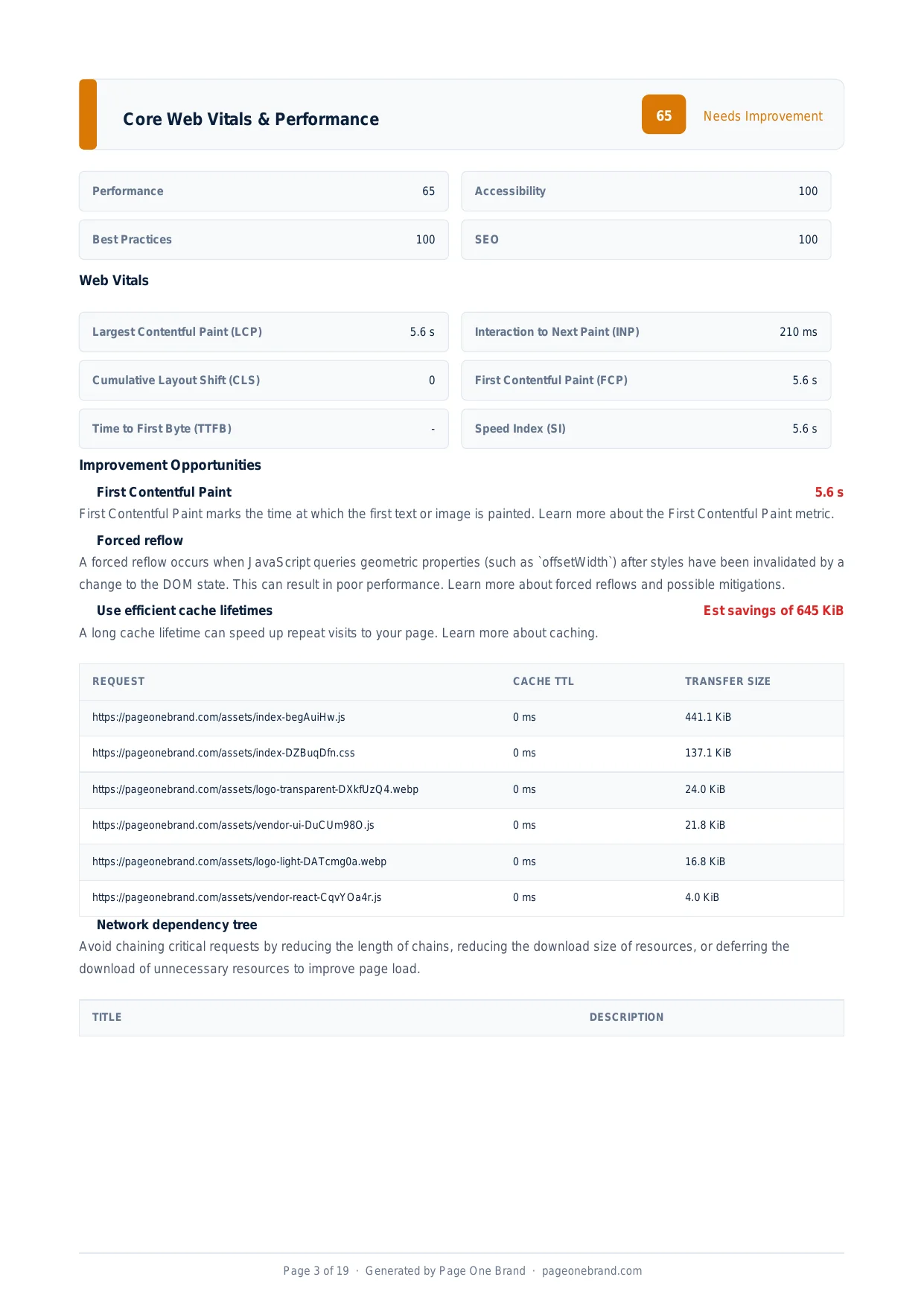
Core Web Vitals & Performance
Why Most Sites Can Ship ES6+ JavaScript Without Transpiling It
By Robert Belkin, Founder & Lead Strategist
Published · 6 min read
When Babel was introduced in 2015, transpiling was essential: Internet Explorer did not support arrow functions, async/await did not exist, and const was a novelty. Today's browser landscape is unrecognisably different. The modern browsers that make up 95%+ of real-world traffic have natively supported arrow functions, classes, destructuring, template literals, async/await, optional chaining, and nullish coalescing for years. Transpiling these features down to ES5 still costs your users kilobytes of polyfills and milliseconds of parse time — for zero benefit.
What Transpiling Does to Your Bundle
When Babel or TypeScript's compiler targets ES5, it transforms modern syntax into older equivalents. Arrow functions become function expressions with manual this binding. Classes become prototype chains with constructor functions. Async/await becomes generator functions wrapped in runtime helpers. Template literals become string concatenation.
Each transformation adds code. Runtime helpers are injected into every file that uses the corresponding feature, or they all import from @babel/runtime, which itself becomes a large shared dependency.
The Lighthouse "Legacy JavaScript" audit identifies polyfills and Babel transforms that are unnecessary for modern browsers. The most common findings: the regenerator runtime (for async/await), transform-classes output, and Promise polyfills — all shipping to browsers that have supported these features since 2017.
The Legacy JavaScript opportunity identifies specific files where unnecessary transpilation output can be removed, with estimated kilobyte savings per file.
What Baseline Means and Why It Matters
The web platform now uses the concept of Baseline to communicate when a feature is safe to use without transpiling. A feature reaches Baseline Newly Available when it is supported in the current and previous versions of Chrome, Edge, Firefox, and Safari. After 30 months, it reaches Baseline Widely Available.
The core ES6+ features — arrow functions, const/let, destructuring, rest/spread, template literals, classes, Map, Set, Promise, Symbol, modules, async/await, optional chaining, nullish coalescing, Array.from, Object.assign — are all Baseline Widely Available. Shipping polyfills for them in 2026 is purely wasteful.
How to Configure Your Build for Modern Browsers
In a Vite project, update the build target:
// vite.config.ts
export default {
  build: {
    target: 'es2020'
  }
}
In a project using a browserslist configuration, update the query:
"browserslist": "> 1%, last 2 versions, not dead, not ie 11"
The not ie 11 clause is important — IE 11 support is the single biggest driver of unnecessary transpilation. If your analytics confirm you have no IE 11 users (you almost certainly do not), dropping it from the target unlocks significant bundle size savings.
 Eliminating unnecessary transpilation reduces JavaScript bundle size, improving parse and compile time, TTI, and the overall Performance score.
When You Still Need to Transpile
Not everything is Baseline. Very new JavaScript proposals — Stage 3 features not yet in all four major engines, features that landed in Chrome but not Safari — still need transpilation for broad support. TypeScript features that have no JavaScript equivalent require a TypeScript compiler step regardless.
The right approach is surgical: transpile only what genuinely needs transpiling, for the specific browser gaps in your actual user base. If your analytics show 99% of users are on browsers that support ES2022, target ES2022. If you have a meaningful audience on older Safari (a common edge case — iOS forces all browsers to use WebKit), check which features that Safari version supports before removing transpilation.
After updating your build target, rerun the Page Quality Analyzer. The Legacy JavaScript opportunity should report zero or near-zero savings. The bundle size reduction flows through to FCP, TTI, Max Potential FID, and the overall Performance score — all improving from a configuration change that takes under five minutes to make.
Frequently Asked Questions About Modern JavaScript
Why is transpiling ES6+ to ES5 still a problem in 2026?
Transpiling modern JavaScript to ES5 adds runtime helpers and polyfills for features that all modern browsers have supported natively for years. Arrow functions become function expressions with manual this binding. Async/await becomes generator functions wrapped in the regenerator runtime — a significant bundle overhead. Classes become prototype chains. Each transformation adds code. The result is larger JavaScript bundles that take longer to download, parse, and execute — a real cost paid by every user, on every page load, for zero benefit on any browser released in the last seven or more years.
What is Baseline and which ES6+ features are safe to ship without transpiling?
Baseline is a web platform concept that communicates when a feature is safe to use without transpiling. A feature reaches Baseline Widely Available after being supported in stable versions of Chrome, Edge, Firefox, and Safari for 30 months. The core ES6+ features — arrow functions, const and let, destructuring, rest and spread syntax, template literals, classes, Map and Set, Promise, Symbol, modules, async/await, optional chaining, and nullish coalescing — are all Baseline Widely Available. In 2026, shipping polyfills for any of these adds bundle weight and parse time for zero real-world compatibility benefit.
How do I configure Vite or a browserslist to stop unnecessary transpilation?
In a Vite project, set the build target in vite.config.ts to es2020 or later: build: { target: 'es2020' }. For projects using a browserslist configuration, update the query to exclude Internet Explorer: > 1%, last 2 versions, not dead, not ie 11. The not ie 11 clause is the single most important change — IE 11 support is the primary driver of unnecessary transpilation output. If your analytics confirm zero IE 11 usage (likely), dropping it from the target can reduce bundle size significantly. After the change, the Lighthouse Legacy JavaScript audit should report zero or near-zero savings.
What still needs transpiling even when targeting modern browsers?
Very new JavaScript proposals that have not yet reached all four major browser engines still need transpilation for broad support. Features that landed in Chrome but not yet in Safari — a common gap given Safari's release cadence — require a transpilation step for users on iOS, since iOS forces all browsers to use WebKit. TypeScript-specific syntax like type annotations, generics, and decorators always requires a TypeScript compiler step because these features have no JavaScript equivalent. The right approach is surgical: identify which specific features in your codebase are not yet Baseline, and transpile only those rather than transforming the entire codebase to ES5.