Core Web Vitals & Performance
Forced Reflows: Why Querying Layout After DOM Changes Destroys Performance
By Robert Belkin, Founder & Lead Strategist
Published · Reviewed by Robert Belkin · 6 min read
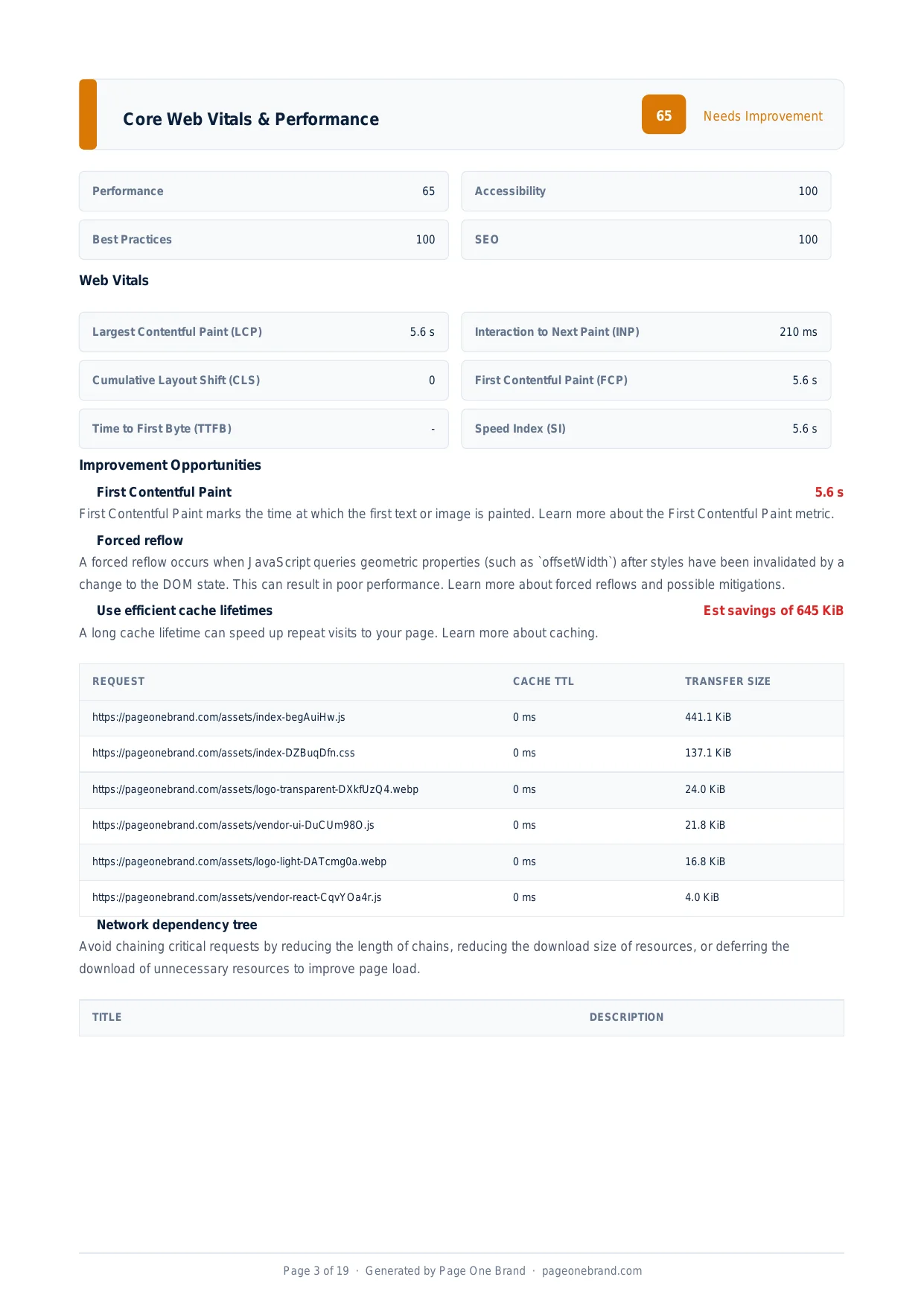
A forced reflow — sometimes called layout thrashing — occurs when JavaScript reads layout-dependent properties (like element width, height, or position) immediately after making changes to the DOM or CSS. It forces the browser to abandon its normal batching behaviour and recalculate the layout of the entire page right now, synchronously, on the main thread. In isolation it is a performance tax. In a loop, it can make pages completely unresponsive.
How the Browser Normally Handles Layout
The browser batches multiple DOM changes and performs a single layout pass at the end of the current frame. This batching holds as long as JavaScript does not ask "what are the current dimensions of this element?" That question invalidates the batch — the browser must immediately calculate the current layout, incorporating all pending DOM changes, before it can answer. This synchronous calculation is the forced reflow.
The Code Pattern That Causes It
The classic forced reflow pattern alternates reads and writes:
element.style.width = "200px";        // Write: invalidates layout
const height = element.offsetHeight;  // Read: forces layout recalculation
element.style.height = height + "px"; // Write: invalidates layout again
const width = element.offsetWidth;    // Read: forces layout again
Properties that trigger a forced reflow when read include: offsetWidth, offsetHeight, offsetTop, scrollTop, scrollHeight, clientWidth, clientHeight, getBoundingClientRect(), and getComputedStyle().
The forced reflow opportunity in a Performance report — it indicates JavaScript is querying geometry after DOM mutation, forcing layout recalculation on every read.
Why It Is a Problem: Layout Thrashing
A single forced reflow is a small tax — perhaps 1 to 5ms for a typical page. The problem is when the pattern appears inside a loop. Consider a function that iterates over a list of 50 elements, reads each element's height, and sets a related property based on it. That is 50 forced reflows — 50 full layout recalculations — in the time it takes to process the loop. On a complex page, that can mean hundreds of milliseconds of main-thread time spent purely on layout calculation.
This is layout thrashing: the browser thrashes back and forth between valid and invalid layout on every iteration. It is one of the most common causes of animation jank and interactions that have a perceptible delay.
How to Fix Forced Reflows
Batch all reads before all writes. The golden rule of DOM performance: collect all the geometry values you need first, then apply all your writes afterwards. The browser performs one layout calculation for the reads, then batches all the writes — no interleaving.
// Read all values first
const heights = elements.map(el => el.offsetHeight);
// Then write them all
elements.forEach((el, i) => { el.style.height = heights[i] + "px"; });
Use requestAnimationFrame. Schedule DOM writes inside a requestAnimationFrame callback. Reads happen outside rAF (during the previous frame), and writes happen inside it — naturally separating the two phases.
Cache geometry values. If you need to read an element's dimensions multiple times, read it once and store the value in a variable. Repeated reads of the same property are redundant reflows.
 Forced reflows add to main-thread work, raising TTI and potentially INP — fixing them is a code-level change that requires no infrastructure changes.
Finding Forced Reflows in the Wild
Chrome DevTools Performance panel identifies forced reflows precisely. Record a timeline and look for purple layout blocks preceded by a yellow script execution block. When you see this pattern — script, then immediate layout — a forced reflow occurred. Click the layout block to see which function triggered it.
Third-party scripts are a common and often overlooked source — an analytics script that reads element positions to measure click targets can generate forced reflows on every page interaction. For third-party-caused reflows, loading the script with a delay or replacing it with one that uses Intersection Observer for position tracking are the available options. For your own code, the batch-reads-before-writes pattern eliminates the problem entirely.
Complete Reference: DOM Properties That Trigger Forced Reflows
Any JavaScript property read or method call that requires the browser to know the current layout of the page will trigger a forced reflow if the layout is currently invalid (i.e. pending DOM writes exist). The following reference covers every significant property in this category.
| Property / Method | Notes |
|---|
| element.offsetWidth / offsetHeight | Most commonly encountered. Returns the visible width/height including padding and border. |
| element.offsetTop / offsetLeft | Position relative to the offsetParent. Frequently used in scroll-tracking code. |
| element.scrollWidth / scrollHeight | Total scrollable dimension including overflow content. |
| element.scrollTop / scrollLeft | Current scroll position. Reading is a reflow; writing also triggers one. |
| element.clientWidth / clientHeight | Inner size including padding but not border or scrollbar. |
| element.getBoundingClientRect() | Returns a DOMRect with position and size relative to the viewport. Very commonly used in intersection calculations and tooltips. |
| element.getClientRects() | Returns a collection of DOMRects for inline elements that span multiple lines. |
| window.getComputedStyle(element) | Returns the resolved CSS values for an element. Any property access on the returned object triggers a reflow. |
| element.focus() | May trigger a reflow to scroll the element into view. |
| element.scrollIntoView() | Always triggers layout calculation to determine scroll target position. |
| element.innerText (read) | Unlike innerHTML, reading innerText triggers layout because it computes text as rendered (respecting CSS display: none). |
| window.innerWidth / innerHeight | Viewport dimensions. Safe to cache after the resize event; do not read in tight loops. |
Modern Alternatives: Avoiding Forced Reflows with Browser APIs
Modern browser APIs are designed to avoid forced reflows by providing asynchronous, browser-scheduled callbacks that fire at safe points in the rendering cycle — after layout, not before.
ResizeObserver fires a callback whenever an observed element changes size. Instead of reading offsetWidth in a loop to detect resizing, use a ResizeObserver: the callback receives the new dimensions directly, with no forced reflow. ResizeObserver callbacks fire after layout, so reads inside the callback do not trigger additional reflows.
const ro = new ResizeObserver(entries => {
  for (const entry of entries) {
    // entry.contentRect.width is available without a reflow
    console.log(entry.contentRect.width);
  }
});
ro.observe(element);
IntersectionObserver is the replacement for scroll-handler + getBoundingClientRect() patterns used to detect whether an element is visible. Instead of calling getBoundingClientRect() on every scroll event (a forced reflow per event), IntersectionObserver fires asynchronously when an element's visibility changes relative to a root element or the viewport.
const io = new IntersectionObserver(entries => {
  entries.forEach(entry => {
    if (entry.isIntersecting) {
      // element entered the viewport — no getBoundingClientRect() needed
    }
  });
}, { threshold: 0.1 });
io.observe(element);
Both APIs are supported across all modern browsers and significantly reduce forced reflows in the scroll and resize scenarios where they most commonly occur.
Performance Impact: Real Numbers
The cost of a forced reflow depends on DOM complexity. A simple static page with a small DOM may produce reflows of 1–3ms each — tolerable. A content-heavy page with thousands of nodes, deeply nested layouts, or complex CSS selectors can produce reflows of 5–20ms per call.
Lighthouse flags any task on the main thread that takes longer than 50ms as a Long Task. A loop that triggers 10 forced reflows on a complex DOM can produce a single Long Task of 100–200ms. This directly impacts:
- Total Blocking Time (TBT) — the sum of all time over 50ms spent on the main thread during load. TBT accounts for 30% of the Lighthouse Performance score.
- Interaction to Next Paint (INP) — Google's Core Web Vital measuring how quickly the page responds to user input. INP's threshold is 200ms (Good) / 500ms (Poor). Forced reflows in interaction handlers — such as click or scroll handlers — directly increase INP. INP replaced FID as a Core Web Vital in March 2024.
- Animation frame rate. Reflows triggered inside
requestAnimationFrame callbacks or in response to pointer events can cause frames to take longer than 16ms, producing visible jank at sub-60fps frame rates.
Profiling Forced Reflows in Chrome DevTools: Step by Step
- Open DevTools (F12 or Cmd+Option+I) and navigate to the Performance panel.
- Click Record, interact with the page in the way that feels slow, then click Stop.
- In the flame chart, look at the Main thread row. Purple Layout blocks indicate layout calculations. A red triangle in the top-right corner of a block indicates a problematic event.
- When you see a yellow Script block immediately followed by a purple Layout block, a forced reflow has occurred — JavaScript triggered an immediate layout calculation.
- Click the Layout block. In the Summary panel below, look for the warning: "Forced reflow is a likely performance bottleneck." The Initiator link shows exactly which JavaScript function triggered it.
- Use the Call Tree and Bottom-Up tabs to find the specific line of code responsible. Fix using the batch-reads-before-writes pattern or a ResizeObserver/IntersectionObserver replacement.
Frequently Asked Questions About Forced Reflows
What is the difference between a reflow and a repaint?
A reflow (also called layout) recalculates the position and geometry of every affected element in the DOM tree. It is expensive because changes cascade — changing a parent element's width can affect all of its children's positions. A repaint occurs when an element's visual appearance changes but its geometry does not: changing a background colour, outline, or visibility triggers a repaint without a reflow. Reflows always trigger repaints. Repaints do not always trigger reflows. To minimise cost, prefer CSS properties that trigger only compositing (transform, opacity) over properties that trigger layout (width, height, top, left).
Do modern browsers batch forced reflows automatically?
Browsers batch DOM writes within a single task — multiple style changes applied in sequence without any intervening reads will be applied in one layout pass. However, the moment JavaScript reads a layout-dependent property after making a write, the browser cannot defer the layout any further and must calculate immediately. No browser can overcome this fundamental constraint: it must provide accurate geometry values when JavaScript asks for them, and those values cannot be calculated without a current layout. The batching only works when reads and writes are cleanly separated.
How does the FastDOM library prevent layout thrashing?
FastDOM (by Wilson Page) is a small JavaScript library that batches all DOM reads and writes using requestAnimationFrame. You call fastdom.measure(fn) for reads and fastdom.mutate(fn) for writes. FastDOM queues all measure callbacks to run before any mutate callbacks in the next animation frame, ensuring reads always precede writes and eliminating interleaved access patterns. It is a useful abstraction for codebases where the read/write separation is difficult to maintain manually, though the underlying principle — batch your reads, then batch your writes — is always the most direct fix.
Are forced reflows always caused by JavaScript?
In practice, yes — the problematic forced reflows that appear in performance profiles are caused by JavaScript reading geometry after writing to the DOM. CSS animations and transitions that use GPU-composited properties (transform, opacity) do not cause reflows at all. However, CSS animations that animate layout properties (width, height, top, margin) do trigger reflows on each frame, which is why animating transform: translateX() instead of left: is always recommended for animated movement.
Editorial implementation brief · Performance
Fix forced reflows by separating reads from writes
The useful unit of work is not “remove every layout.” It is to stop JavaScript from reading geometry immediately after invalidating it, especially inside scroll, resize, and pointer handlers.
What to check, in order
- Record a trace while reproducing the slow interaction and inspect the Main thread for long Script and Layout blocks.
- Find the initiating read, such as
offsetWidth or getBoundingClientRect(), after a class/style write. - Read all required geometry first, then apply classes or styles in one batch.
- Use
requestAnimationFrame for visual updates and ResizeObserver or IntersectionObserver instead of polling layout in a loop. - Repeat the same interaction trace and compare long-task duration, layout count, and input delay.
Copy-paste example
const width = card.getBoundingClientRect().width; // read phase
const height = card.getBoundingClientRect().height;

requestAnimationFrame(() => { // write phase
  card.style.transform = `translateX(${width}px)`;
  card.style.height = `${height}px`;
});
Evidence from our workflow
Our evidence standard is a before/after DevTools trace from the same interaction, not a synthetic claim that a particular API is always faster. We note whether the layout was caused by our code or by a third-party widget before recommending a replacement.
Primary sources
Editorial note: This guide was written by Robert Belkin, Founder & Lead Strategist at Page One Brand, and technically reviewed by Robert Belkin on August 25, 2026. See the author profile, scoring methodology, and contact page for supporting business and editorial information.