Core Web Vitals & Performance
Third-Party Cookie Restrictions: What They Are and How to Prepare Your Site
By Robert Belkin, Founder & Lead Strategist
Published · Reviewed by Robert Belkin · 6 min read
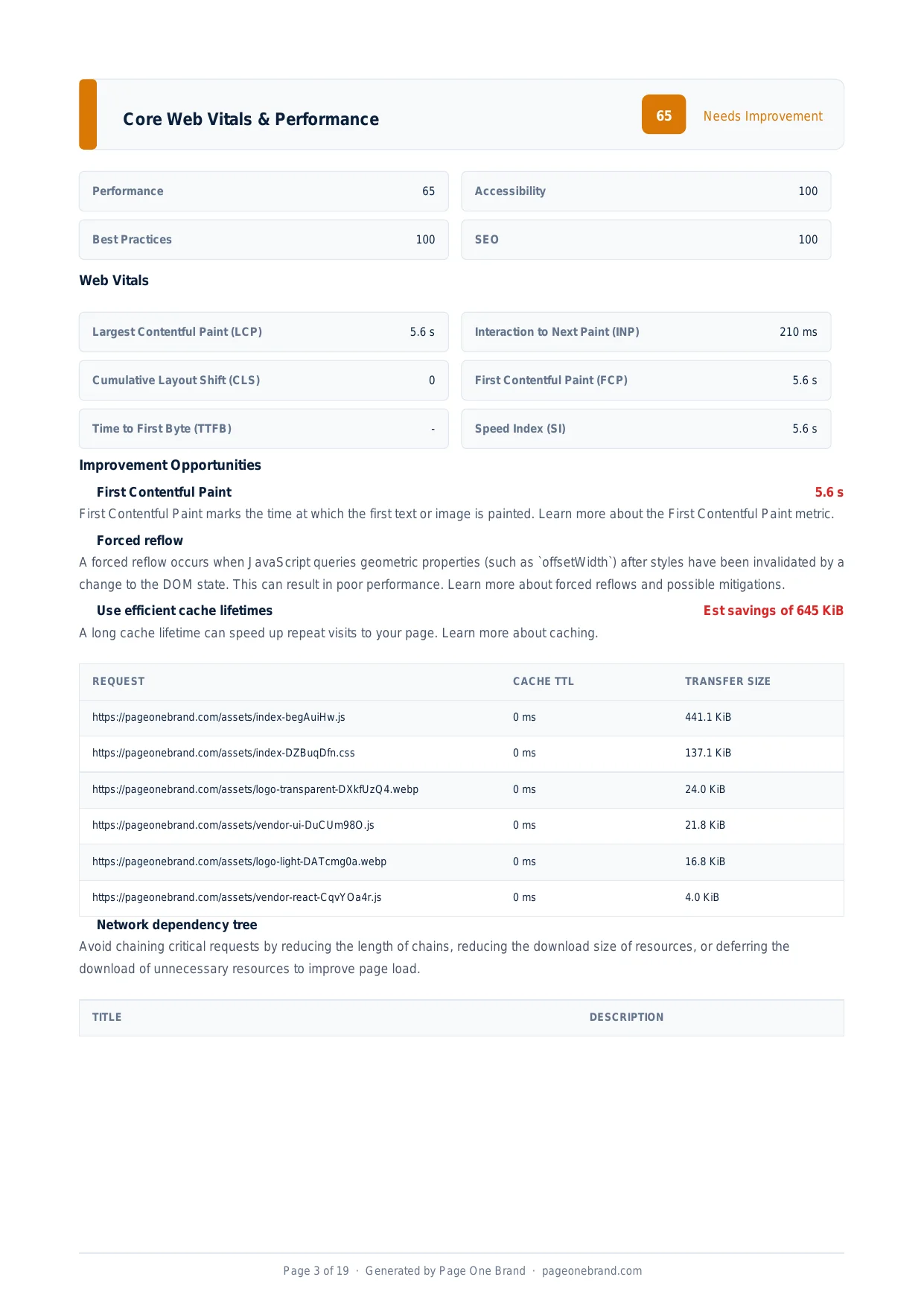
Third-party cookies have been the backbone of cross-site tracking, advertising measurement, and embedded widget authentication for decades. Browsers are now blocking them by default — Firefox and Safari have blocked them for years, and Chrome has been progressively restricting them. If your site embeds third-party content that sets cookies, Lighthouse will flag this — and it is worth understanding what it means and what you can do about it.
What Third-Party Cookies Are
A first-party cookie is set by the site you are visiting — your domain sets a cookie that your browser sends back to your domain on future requests. A third-party cookie is set by a different domain — a YouTube embed on your page sets cookies from youtube.com, an analytics script sets cookies from analytics.thirdparty.com, and an ad pixel sets cookies from the ad platform's domain.
Third-party cookies can be read by the setting domain across any site that embeds that domain's content. This is what makes them useful for cross-site tracking and advertising attribution — and it is exactly what browsers are restricting, because it enables tracking users across the web without their explicit consent.
When Lighthouse flags "Uses third-party cookies," it is identifying cookies set by embedded resources from domains other than the page's origin. The flag does not mean your site is broken — it means some functionality may degrade as browsers tighten restrictions.
The third-party cookie audit lists the specific domains setting cookies and the cookie names — making it easy to identify which embeds are affected.
Which Embeds Are Most Commonly Affected
YouTube embeds set several cookies from youtube.com: session identifiers, preference cookies, and video tracking cookies. These are flagged by Lighthouse but largely cosmetic — the embed continues to function for users with those cookies blocked, though personalisation features may not work. Using the youtube-nocookie.com domain reduces the scope of cookies set: https://www.youtube-nocookie.com/embed/VIDEO_ID.
Analytics pixels. Facebook Pixel, Google Analytics (Universal Analytics), and similar tools traditionally set third-party cookies to track user behaviour across sessions and sites. Meta's Pixel sets cookies from facebook.com on any site that includes it.
Single sign-on and embedded authentication. Some older SSO implementations rely on third-party cookies to maintain session state across domains. When cookies are blocked, these flows break.
Comment systems and social widgets. Disqus, embedded social media timelines, and Like buttons all set cookies from their respective domains.
What is Changing and When
Safari has blocked third-party cookies by default since 2020 via Intelligent Tracking Prevention. Firefox blocks them by default with Enhanced Tracking Protection. Chrome has been progressively restricting them as part of the Privacy Sandbox initiative. The trajectory is clear: third-party cookies are going away for cross-site tracking in all major browsers.
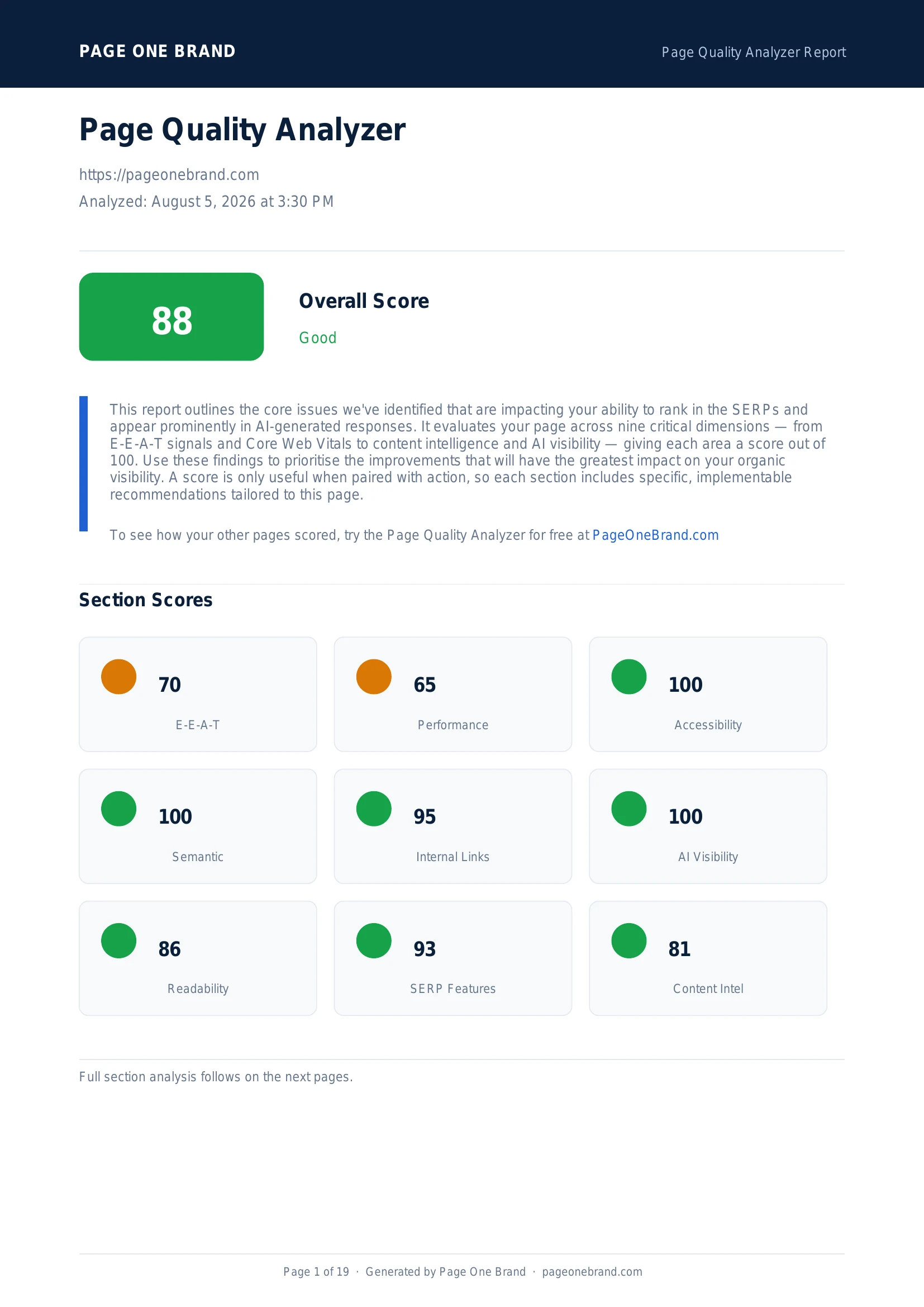 Third-party cookie restrictions are flagged in the Performance section — they signal a dependency that may break as browser policies tighten.
What to Do About It
For analytics: Migrate to first-party analytics. Server-side tagging — sending events to your own server, which then forwards them to analytics platforms — uses first-party cookies not subject to third-party restrictions. Google Tag Manager supports server-side containers. Alternatively, use a privacy-first analytics tool like Plausible or Fathom that relies entirely on first-party data.
For advertising attribution: Adopt the Privacy Sandbox APIs that replace third-party cookie functionality. Meta's Conversions API and Google's Enhanced Conversions allow server-to-server event reporting that does not rely on browser-set cookies.
For cross-domain authentication: Migrate to CHIPS (Cookies Having Independent Partitioned State), which allows cookies in third-party contexts but partitions them by top-level site so they cannot be used for cross-site tracking.
Third-party cookie restriction is fundamentally a privacy improvement. Addressing it proactively prevents functionality breakage and keeps your Lighthouse audit clean in the Page Quality Analyzer.
Frequently Asked Questions About Third-Party Cookies
What is the difference between a first-party and a third-party cookie?
A first-party cookie is set by the domain you are currently visiting — your server sets a cookie that your browser sends back to your domain on future requests. A third-party cookie is set by a different domain — a YouTube embed on your page sets cookies from youtube.com, an analytics script sets cookies from the analytics platform's domain, and an advertising pixel sets cookies from the ad network's domain. Third-party cookies can be read by the setting domain across any site that embeds that domain's content, which is what enables cross-site tracking and advertising attribution — and what browsers are restricting.
Which browsers are blocking third-party cookies and since when?
Safari has blocked third-party cookies by default since 2020 via Intelligent Tracking Prevention, making it the longest-standing restriction in widespread use. Firefox blocks them by default with Enhanced Tracking Protection. Chrome has been progressively restricting them as part of the Privacy Sandbox initiative. The trajectory across all three major browser families is clear: third-party cookies are going away for cross-site tracking. Sites that rely on third-party cookies for analytics, advertising measurement, or cross-domain authentication should plan for a world where those cookies are unavailable in the majority of browser sessions.
How do third-party cookie restrictions affect analytics and advertising?
Analytics tools that set cookies from a third-party domain — including older versions of Google Analytics, Facebook Pixel, and similar platforms — lose the ability to track user sessions across pages or attribute conversions when their cookies are blocked. For analytics, the migration path is server-side tagging: sending events to your own server, which forwards them to analytics platforms using first-party cookies not subject to third-party restrictions. For advertising attribution, Meta's Conversions API and Google's Enhanced Conversions support server-to-server event reporting that bypasses browser cookie restrictions entirely.
What is CHIPS and how does it address third-party cookie restrictions?
CHIPS — Cookies Having Independent Partitioned State — is a browser mechanism that allows cookies in third-party contexts but partitions them by top-level site. A CHIPS cookie set by analytics.example.com while a user is on siteA.com cannot be read when that same user visits siteB.com — the cookies are siloed per top-level site, preventing cross-site tracking. CHIPS is the appropriate solution for embedded widgets and cross-domain authentication flows that need cookies to function but do not need to track users across multiple sites. It is implemented with the Partitioned attribute in the Set-Cookie header.
Editorial implementation brief · SEO
A dependency inventory for cookie changes
A cookie warning is not automatically a ranking issue. It is a product, privacy, and measurement dependency issue: identify the vendor, context, purpose, and failure mode before choosing a replacement.
What to check, in order
- Inventory cookies by domain, name, purpose, lifetime, and whether the request is first- or third-party.
- Separate essential embedded authentication from advertising measurement and analytics.
- For cross-site embedding, check whether
SameSite=None; Secure, partitioned storage, or the Storage Access API fits the use case. - Prefer first-party, consent-aware measurement where the business requirement allows it.
- Test sign-in, checkout, embedded tools, attribution, and consent changes in Safari, Firefox, and Chrome.
Copy-paste example
Set-Cookie: session=opaque-id; Path=/; Secure; HttpOnly; SameSite=Lax

// Cross-site use is explicit and should be limited to the required cookie.
Set-Cookie: embed_session=opaque-id; Path=/; Secure; HttpOnly;
            SameSite=None; Partitioned
Evidence from our workflow
We document the browser, embed context, consent state, cookie attributes, and observed request behaviour for each migration. That makes the recommendation reproducible and avoids claiming that a browser policy change affects every integration in the same way.
Primary sources
Editorial note: This guide was written by Robert Belkin, Founder & Lead Strategist at Page One Brand, and technically reviewed by Robert Belkin on August 25, 2026. See the author profile, scoring methodology, and contact page for supporting business and editorial information.