SEO Strategy
Internal Linking Strategy: How Your Link Structure Signals Authority to Google
By Robert Belkin, Founder & Lead Strategist
Published · Reviewed by Robert Belkin · 9 min read
Internal links are one of the most powerful — and most neglected — levers in SEO. They distribute authority from high-equity pages to lower-performing ones, signal to Google which pages you consider most important, and create pathways that users follow when they want to go deeper into a topic.
Why Internal Linking Matters
PageRank — Google's original algorithm for assessing page authority — flows through links. External backlinks bring authority into your site from outside. Internal links redistribute that authority across your own pages. A piece of content that would otherwise rank poorly can perform significantly better if it receives internal links from pages that already rank well.
Internal links also affect crawlability. Google's crawler discovers pages by following links. A page with no internal links pointing to it — an orphan page — is harder for Google to discover and revisit. If your most important content is not internally linked from multiple other pages, it may be crawled less frequently and ranked less prominently than its quality warrants.
Beyond crawl efficiency and authority distribution, internal links signal topical organisation. A site where every relevant page links to related content on the same topic is demonstrating topical authority — the site knows its subject well enough to cross-reference it coherently.
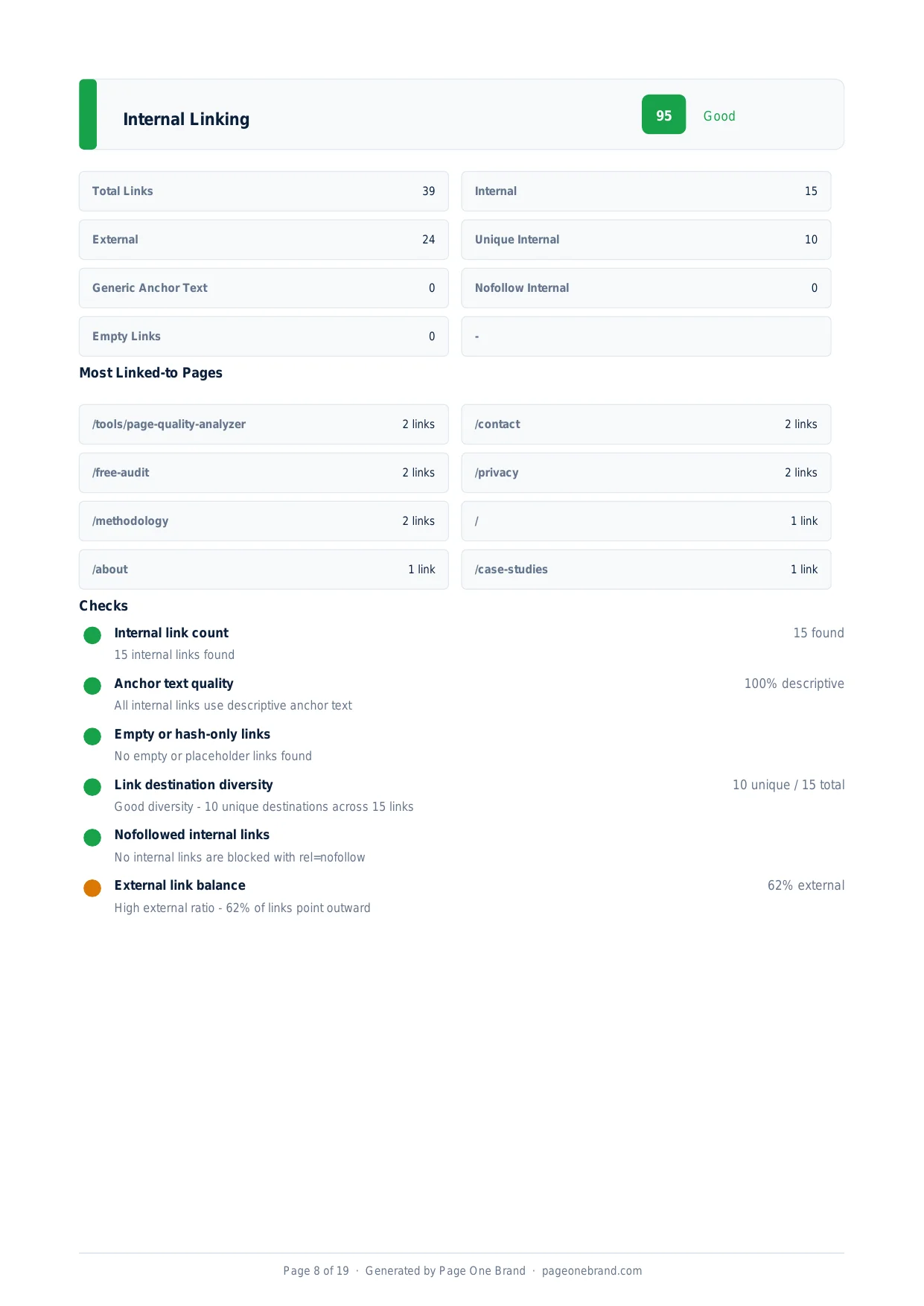
The Internal Linking section of a real scan — showing the breakdown of internal vs external links, anchor text quality, and which pages receive the most links.
How We Calculate the Internal Linking Score
- Internal link count. How many unique internal links does the page contain? Pages with very few internal links lose points even if those links are technically sound.
- Anchor text quality. Are internal link anchor texts descriptive? Generic anchor text like "click here" or "read more" tells Google nothing about the destination page.
- Empty or hash-only links. Links with no href, empty href attributes, or href="#" are flagged. They appear in navigation menus and JavaScript-driven elements and waste link equity.
- Destination diversity. Healthy internal linking distributes authority across the site rather than concentrating it on one or two destinations.
- External link balance. Pages that link significantly more externally than internally risk leaking authority. We flag high external-to-internal ratios as a warning signal.
The Anatomy of a Good Internal Link
- A destination that deserves to rank. Your highest-priority commercial pages should receive the most internal links from high-traffic content.
- Descriptive anchor text. The anchor text should describe what the destination page is about, using language close to what users search for.
- Contextual placement. Links embedded in the body of content pass more authority and get more clicks than links in footers or sidebar widgets.
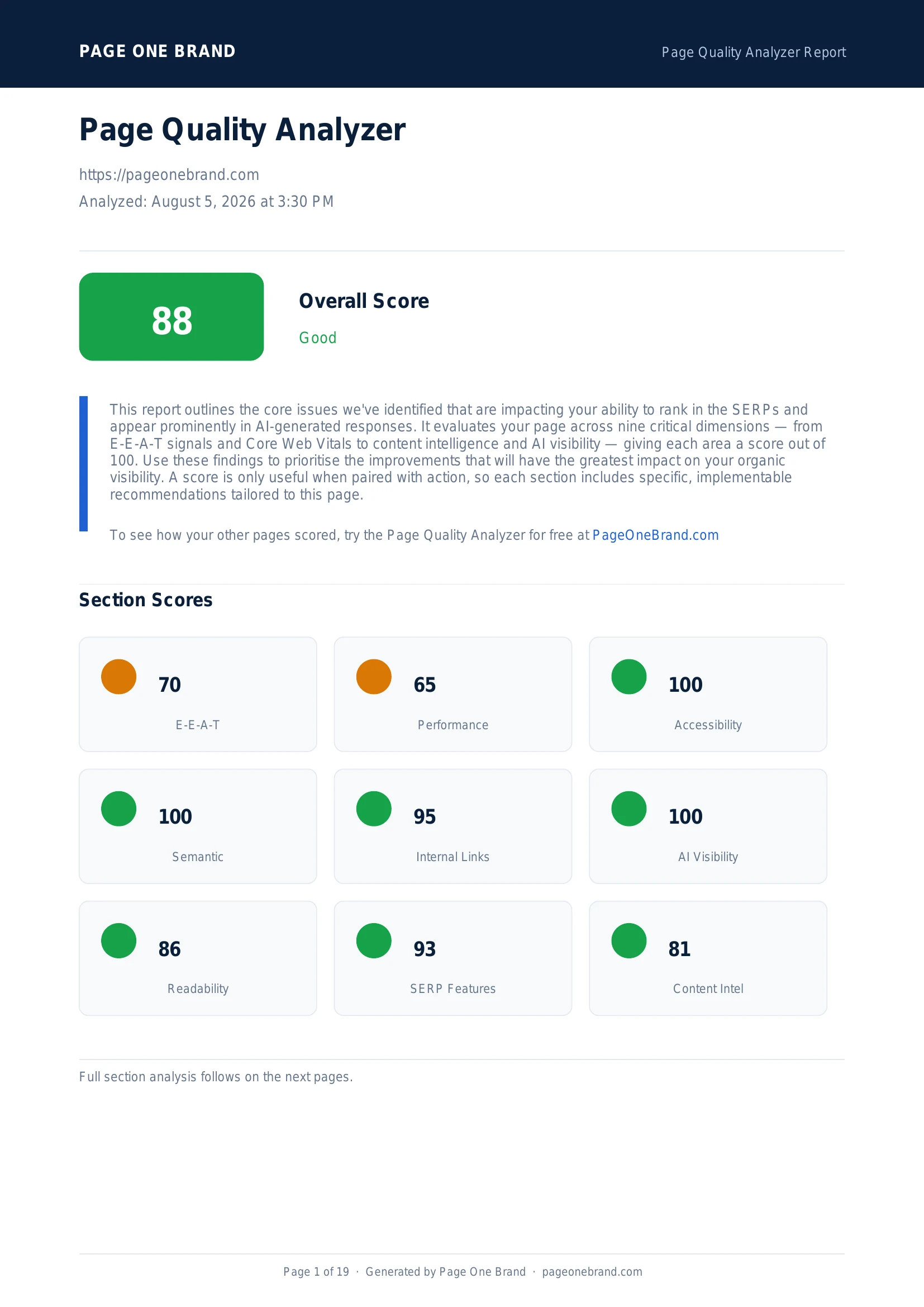 Internal Links is one of the four rule-based dimensions in the Page Quality Analyzer. With a good linking strategy in place, scores of 90+ are consistently achievable.
How to Improve Your Internal Linking Score
- Audit for orphan pages. Find pages on your site that have no or very few internal links pointing to them. These are your highest-priority internal linking opportunities.
- Update anchor text on existing links. Replace generic anchors with descriptive ones. This alone can improve rankings for pages whose content quality is good but whose internal authority signals are weak.
- Add related-content links in blog posts. Every long-form piece should link to at least three to five other relevant pages on your site, placed contextually within sentences.
- Link from high-traffic pages to conversion pages. Blog posts or resource pages that get significant organic traffic should link prominently to your most important commercial pages.
- Remove or fix empty links. Audit your site for links with no href or href="#" and either fix them or remove them.
Internal linking is unusual among SEO improvements in that the gains compound. As you build more content that links to your key pages, the authority signals accumulate — and the pages on the receiving end get incrementally stronger over time without requiring external link building.
Frequently Asked Questions About Internal Linking
How do internal links affect Google search rankings?
Internal links distribute authority across your site through PageRank flow. External backlinks bring authority into your site from outside; internal links redistribute that authority to your own pages. A piece of content that would otherwise rank poorly can perform significantly better if it receives internal links from pages that already rank well. Internal links also affect crawlability: Google's crawler discovers pages by following links. Pages with no internal links pointing to them — orphan pages — are harder for Google to discover and may be crawled less frequently. Beyond authority and crawlability, internal links signal topical organisation, showing Google that your site understands its subject well enough to cross-reference it coherently.
What is an orphan page and how does it affect SEO?
An orphan page is a page on your site that has no or very few internal links pointing to it from other pages. Because Google's crawler discovers pages primarily by following links, orphan pages are harder for Google to find and revisit. Even if the content is excellent, an orphan page may be crawled infrequently, indexed slowly, and ranked below its quality warrants because it receives no internal authority signals from the rest of the site. Finding and fixing orphan pages — by adding internal links from relevant, high-traffic pages — is one of the highest-priority internal linking improvements available. The Page Quality Analyzer assesses internal link count and destination diversity to flag pages that are likely to be under-linked.
What makes good anchor text for internal links?
Good anchor text is descriptive and specific: it tells both Google and readers what the destination page is about, using language close to what users search for. Generic anchors like "click here", "read more", or "learn more" tell Google nothing about the destination page and waste link equity. Descriptive anchors like "Core Web Vitals guide" or "how to fix layout shift" communicate the topic and contribute to the destination page's keyword signals. Anchor text should ideally vary slightly across different links pointing to the same destination — using exactly the same phrase on every internal link can look unnatural. Contextual placement matters too: links embedded in body copy pass more authority and receive more clicks than links in footers or sidebar widgets.
What does the Page Quality Analyzer check when scoring Internal Linking?
The Internal Linking score assesses five dimensions: the total count of unique internal links on the page; anchor text quality — whether anchors are descriptive or generic; the presence of empty or hash-only links (href="" or href="#"), which appear in navigation menus and waste link equity; destination diversity — whether links are spread across different pages or concentrated on just one or two; and the ratio of external to internal links, flagging high external-to-internal ratios as a warning signal. All checks are based on the HTML of the page being analysed, so no site-wide crawl is needed. The results identify specific links that need anchor text improvement and destinations that are receiving too much or too little linking.
Editorial implementation brief · SEO
An internal-link map built from user journeys, not arbitrary quotas
A useful link answers “what should I read next?” and gives search engines a crawlable route. Link count alone is not a strategy.
What to check, in order
- Choose one hub page and list the supporting pages that satisfy narrower questions.
- Link from the hub to each support page and back when the return path is genuinely useful.
- Use concise, descriptive anchor text such as Core Web Vitals guide, not repeated “click here.”
- Check that important pages are reachable from navigation or another crawlable page and are not blocked by scripts.
- Review links after publishing: remove redirects, fix 404s, and add links from established pages to new work.
Copy-paste example
<p>
  Start with our
  <a href="/blog/core-web-vitals-page-speed-seo-guide">
    Core Web Vitals guide
  </a>
  before tuning an individual metric.
</p>
Evidence from our workflow
We review an article’s link map by recording the source URL, destination URL, anchor text, and the reader question the link resolves. This creates a small, reviewable graph instead of padding a post to hit an arbitrary internal-link count.
Primary sources
Editorial note: This guide was written by Robert Belkin, Founder & Lead Strategist at Page One Brand, and technically reviewed by Robert Belkin on August 25, 2026. See the author profile, scoring methodology, and contact page for supporting business and editorial information.