SEO Strategy
Semantic SEO: How Meta Tags, Schema Markup, and Page Structure Tell Google What You're About
By Robert Belkin, Founder & Lead Strategist
Published · Reviewed by Robert Belkin · 10 min read
Search engines cannot read a page the way a human can. They extract meaning from structured signals — meta tags, schema markup, heading hierarchies, and semantic HTML. Semantic SEO is the practice of providing those signals clearly, so Google understands exactly what your page is about, who it is for, and how it relates to other content on your site.
Why Semantic SEO Matters
Google's understanding of content has become increasingly sophisticated. It moves words and phrases into embedding spaces where similar concepts sit close together — a process called entity understanding. When you provide clear meta tags, properly typed schema markup, and a logical heading structure, you reduce the interpretive work Google has to do and increase the reliability with which it understands your content.
Semantic SEO also unlocks specific Google features. Rich results — the enhanced search listings with ratings, FAQs, event dates, product prices — require valid structured data. Open Graph tags control how your links preview when shared on social platforms. Canonical tags prevent duplicate content issues when the same content appears at multiple URLs.
Semantic SEO checks are rule-based — they either pass or fail. This makes the Semantic SEO dimension one of the most actionable in the Page Quality Analyzer: everything in it can be fixed with deterministic code changes.
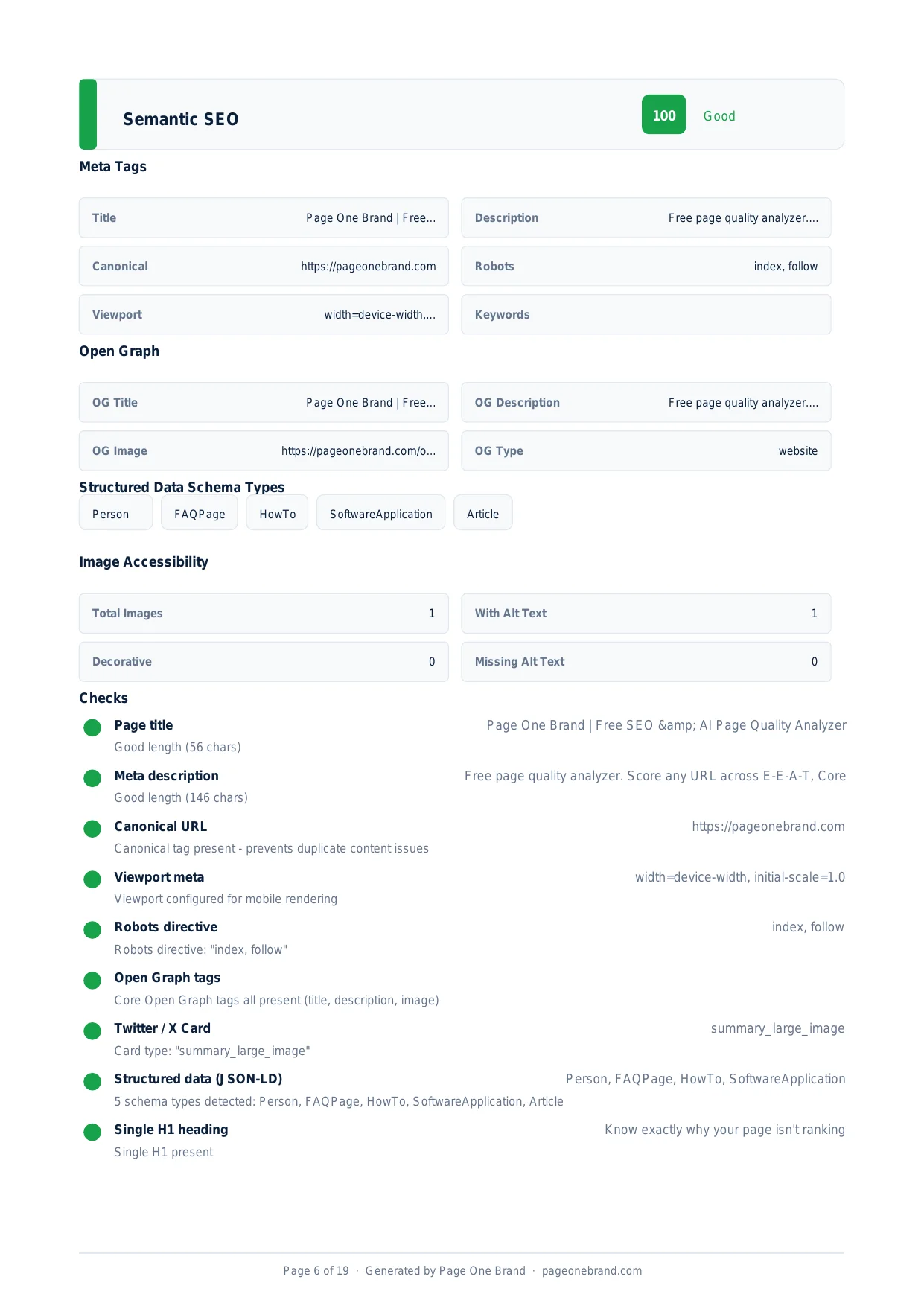
The Semantic SEO section of a real scan — showing which meta tags are present, which schema types are detected, and whether the heading hierarchy and HTML5 structure are sound.
How We Calculate the Semantic SEO Score
The Semantic SEO score is a weighted average across six check groups:
- Meta tags — title tag (40-60 characters, keyword inclusion), meta description (100-160 characters), canonical tag, robots directive, viewport meta.
- Open Graph — og:title, og:description, og:image, and og:type. These control social previews on LinkedIn, X, Facebook, Slack, and iMessage.
- Structured data (JSON-LD) — which schema types are present and whether they are valid. We count detected types and flag any that are malformed.
- Single H1 — each page should have exactly one H1 element that clearly identifies the page primary topic.
- Heading hierarchy — heading levels should descend logically (H1 to H2 to H3) without skipping levels.
- HTML5 semantic elements — the page should use landmark elements (main, nav, header, footer, article, aside) to communicate document structure.
The Schema Types That Matter Most
Schema markup is the most underused lever in Semantic SEO. Many sites have an Organization schema and nothing else. The highest-value schema types for most business websites:
- FAQPage — marks up questions and answers so Google can surface them in People Also Ask boxes and as FAQ rich results directly in the SERP.
- HowTo — for step-by-step content, enables a rich result with individual steps shown directly in search.
- Article or BlogPosting — associates author, publication date, and publisher with content. Required for news-eligible content.
- AggregateRating — displays star ratings in search results. Typically 15-30% CTR uplift when visible.
- BreadcrumbList — shows your navigation path below the URL in search results, helping users understand where a page sits in your site hierarchy.
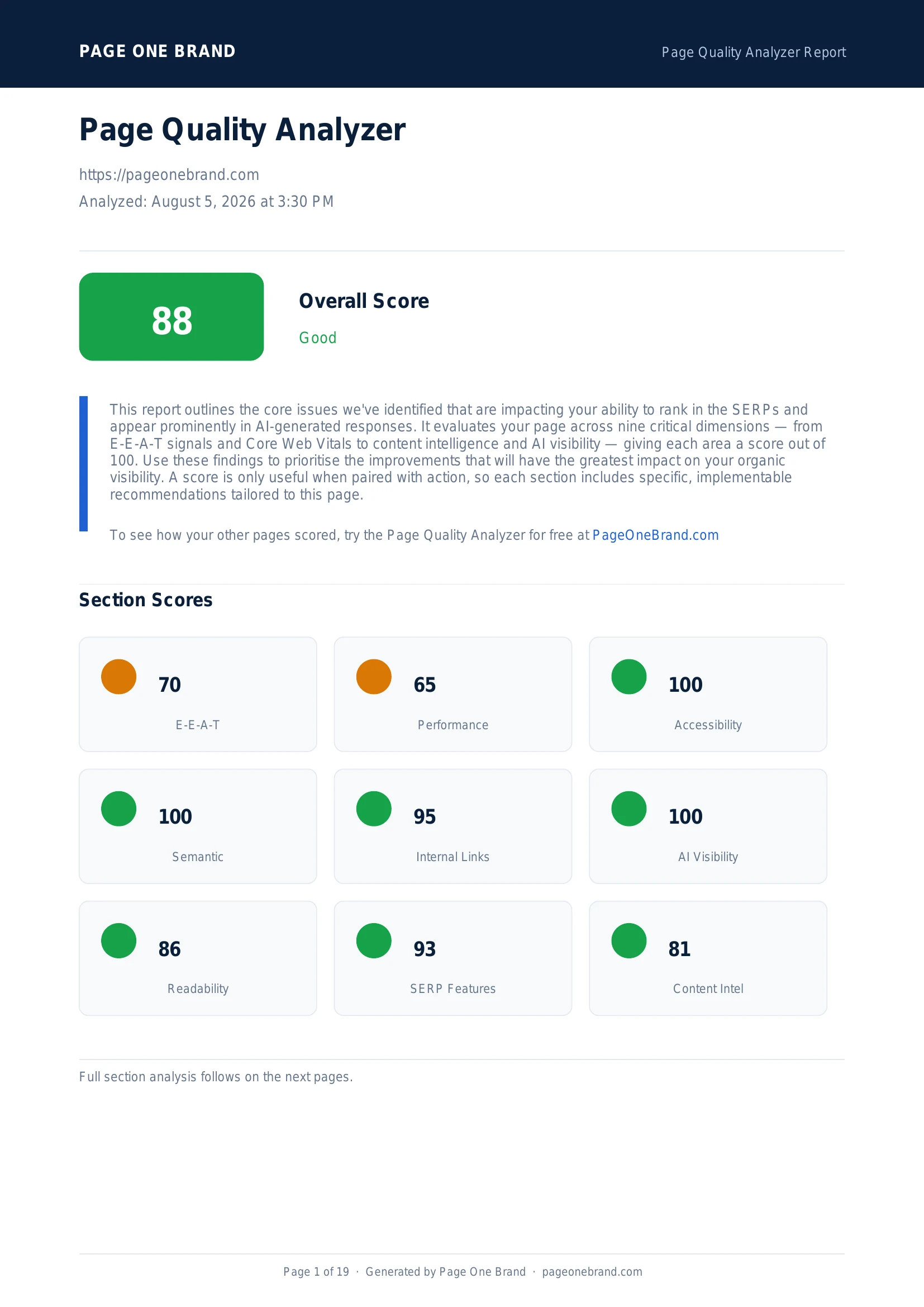 Semantic SEO is one of the four rule-based dimensions where a score of 100 is realistically achievable — every check has a deterministic pass or fail that can be addressed with code changes.
How to Improve Your Semantic SEO Score
- Missing or thin meta description. Every page should have a unique meta description of 100-160 characters that includes the primary keyword and a clear reason to click.
- No canonical tag. Add a canonical link tag to every page, pointing to itself or to the preferred version if content appears at multiple URLs.
- Missing Open Graph image. The og:image tag should point to a 1200 by 630 pixel image. Without it, social link previews appear with no image.
- Limited schema markup. Add JSON-LD schema appropriate to your page type. A business homepage should have Organization, WebSite, and LocalBusiness at minimum.
- Broken heading hierarchy. Audit your heading levels. H2s should not skip to H4s. Every H3 should live inside an H2 section.
Semantic SEO is the most straightforward dimension to improve because every check is binary. Set aside a focused sprint, work through the report findings systematically, and a score of 100 is usually achievable in a single day of work.
Frequently Asked Questions About Semantic SEO
What is the difference between a meta title and an H1?
The meta title (title tag) controls what appears in the browser tab and in the search result listing — it is the clickable blue link in the SERP. The H1 is an on-page heading visible to users when they arrive at the page. They should be similar in meaning but are not required to be identical. The meta title is typically more concise (40-60 characters) and may prioritise keyword placement for search; the H1 can be longer and more conversational for readers. Both should clearly communicate the page's primary topic, but they serve different audiences: the title tag addresses the user in search, the H1 addresses the user on page.
Do Open Graph tags affect Google search rankings?
Open Graph tags do not directly affect Google search rankings. Their primary function is controlling how your links appear when shared on social media platforms — Facebook, LinkedIn, X, Slack, and iMessage all read og:title, og:description, og:image, and og:type to generate link previews. However, pages with properly configured Open Graph previews generate more social clicks, which increases traffic and can indirectly signal content quality. The og:image tag has the largest visible impact: pages without an og:image display a generic preview that generates significantly fewer clicks than pages with a compelling, correctly-sized custom image (1200 by 630 pixels).
What is a canonical tag and when should I use one?
A canonical tag (link rel="canonical") tells Google which version of a URL is the preferred, authoritative one. It is used when the same or very similar content appears at multiple URLs — for example, a product page accessible at both /products/widget and /shop/widget, or a blog post with tracking parameters appended. Without a canonical tag, Google must decide which version to index and may divide ranking signals between duplicates. With a canonical tag, you concentrate all ranking signals on your preferred URL. Every page should have a self-referencing canonical tag even if there is only one URL — it prevents issues with query string variations and protocol inconsistencies.
How many schema types should a page have?
More schema types generally improve SERP Feature Readiness, and multiple types on one page are both valid and encouraged. A business homepage typically benefits from Organization, WebSite, and optionally LocalBusiness. A blog post benefits from BlogPosting or Article (for publication date and author), BreadcrumbList (for navigation path in search results), and FAQPage if the post includes Q&A sections. The most impactful additions for most sites are FAQPage, BreadcrumbList, and Article or BlogPosting — these three together cover the rich results that appear most frequently in search results. Adding multiple schema types to the same page does not create conflicts; the types are processed independently.
Editorial implementation brief · SEO
Semantic SEO means consistent meaning across every representation
Metadata cannot rescue a page whose visible content answers a different question. Make the title, H1, opening answer, canonical URL, and structured data describe the same page.
What to check, in order
- Write one specific title and H1 for the primary query; make the opening paragraph answer it directly.
- Use semantic headings and lists to expose the document outline to readers and crawlers.
- Set a self-referencing canonical only when the URL is the preferred version, and avoid conflicting redirects.
- Add schema only for content that is visible and accurate on the page; validate required properties.
- Review title, description, Open Graph, and JSON-LD after template changes so they do not drift apart.
Copy-paste example
<title>Core Web Vitals: LCP, CLS, and INP Guide</title>
<link rel="canonical"
      href="https://example.com/guides/core-web-vitals">
<h1>Core Web Vitals: LCP, CLS, and INP Guide</h1>
<script type="application/ld+json">
{"@context":"https://schema.org","@type":"Article",
 "headline":"Core Web Vitals: LCP, CLS, and INP Guide"}
</script>
Evidence from our workflow
We audit semantic alignment by putting the rendered title, H1, canonical, visible answer, and JSON-LD side by side in the review record. A schema block is treated as evidence of the visible page, never as a substitute for it.
Primary sources
Editorial note: This guide was written by Robert Belkin, Founder & Lead Strategist at Page One Brand, and technically reviewed by Robert Belkin on August 25, 2026. See the author profile, scoring methodology, and contact page for supporting business and editorial information.