Technical SEO
Web Accessibility and SEO: Why an Inclusive Site Scores Better in Search
By Robert Belkin, Founder & Lead Strategist
Published · 9 min read
Accessibility and SEO are usually discussed as separate disciplines. In practice, they share most of the same technical foundations — and a site that scores well on accessibility almost always performs better in search than one that does not.
Why Accessibility Matters
Around 1.3 billion people globally live with some form of disability. Accessibility — designing and building websites that work for people regardless of how they perceive, navigate, or interact with content — is first and foremost a human requirement. In many jurisdictions it is also a legal one: the EU's Web Accessibility Directive, the US ADA and Section 508, and the UK's Equality Act all impose obligations on certain categories of website.
The SEO connection is structural: many of the techniques that make a page usable for screen readers, keyboard navigation, and low-vision users are the exact same techniques that make a page legible to search engine crawlers. Google's crawler is, in a meaningful sense, a very sophisticated screen reader. It reads text, follows links, interprets headings, and processes structured markup — it relies on the same semantic cues that assistive technologies use.
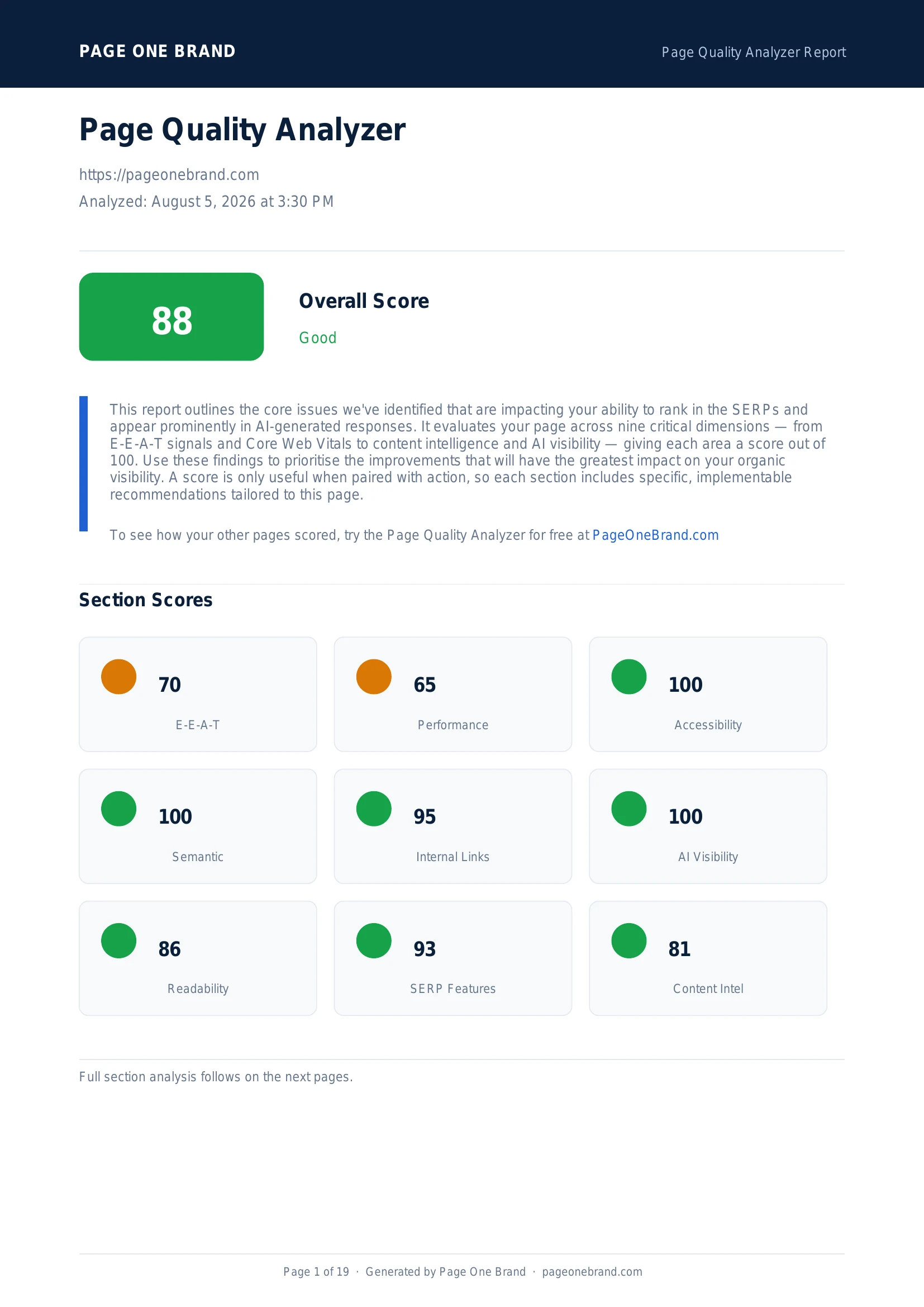
This overlap is why Accessibility is included in the Page Quality Analyzer as a standalone dimension. Pages that score well here are pages whose technical structure is sound — and sound structure benefits both users and search engines.
Accessibility is one of the four rule-based dimensions in the Page Quality Analyzer that typically scores 90+ when the technical fundamentals are in place. A score of 100 is achievable and common.
How We Calculate the Accessibility Score
The Accessibility score is derived from Google's Lighthouse Accessibility audit, called live via the PageSpeed Insights API at the time of your scan. Lighthouse audits over 30 accessibility checks, grouped into four categories:
- Names and labels — do interactive elements (buttons, form inputs, links, images) have accessible names? This covers alt text on images, ARIA labels on custom controls, and button text that describes the action.
- Navigation — can users navigate the page without a mouse? This includes keyboard focus management, skip links, logical tab order, and visible focus indicators.
- Tables and lists — are data tables marked up with proper headers? Are visual lists implemented as semantic list elements rather than styled divs?
- ARIA and semantics — are ARIA attributes used correctly? Does the page use semantic HTML elements (nav, main, header, footer, article) that communicate page structure to assistive technologies?
Lighthouse weights each check by impact. Missing alt text on a decorative image is a minor deduction. A form with no label for its inputs is a critical failure. The score reflects both the number of issues and their severity.
The Most Common Accessibility Failures
- Missing or inadequate image alt text. Decorative images should have an empty alt attribute. Images that convey information should have descriptive alt text communicating what the image shows.
- Insufficient colour contrast. Text that does not meet the WCAG 4.5:1 contrast ratio is the single most common accessibility failure on the web. It affects users with low vision and fails in bright light on mobile screens.
- Form inputs without labels. A placeholder is not a label. When the placeholder disappears as the user types, the context is lost. Every form input needs a visible, programmatically associated label.
- No skip link. Keyboard users have to tab through every navigation item on every page if there is no skip-to-content link. This takes about five minutes to implement.
- Custom interactive elements with no keyboard support. Dropdown menus, modals, carousels, and accordions built from divs often have no keyboard event handlers, making them completely inaccessible to keyboard-only users.
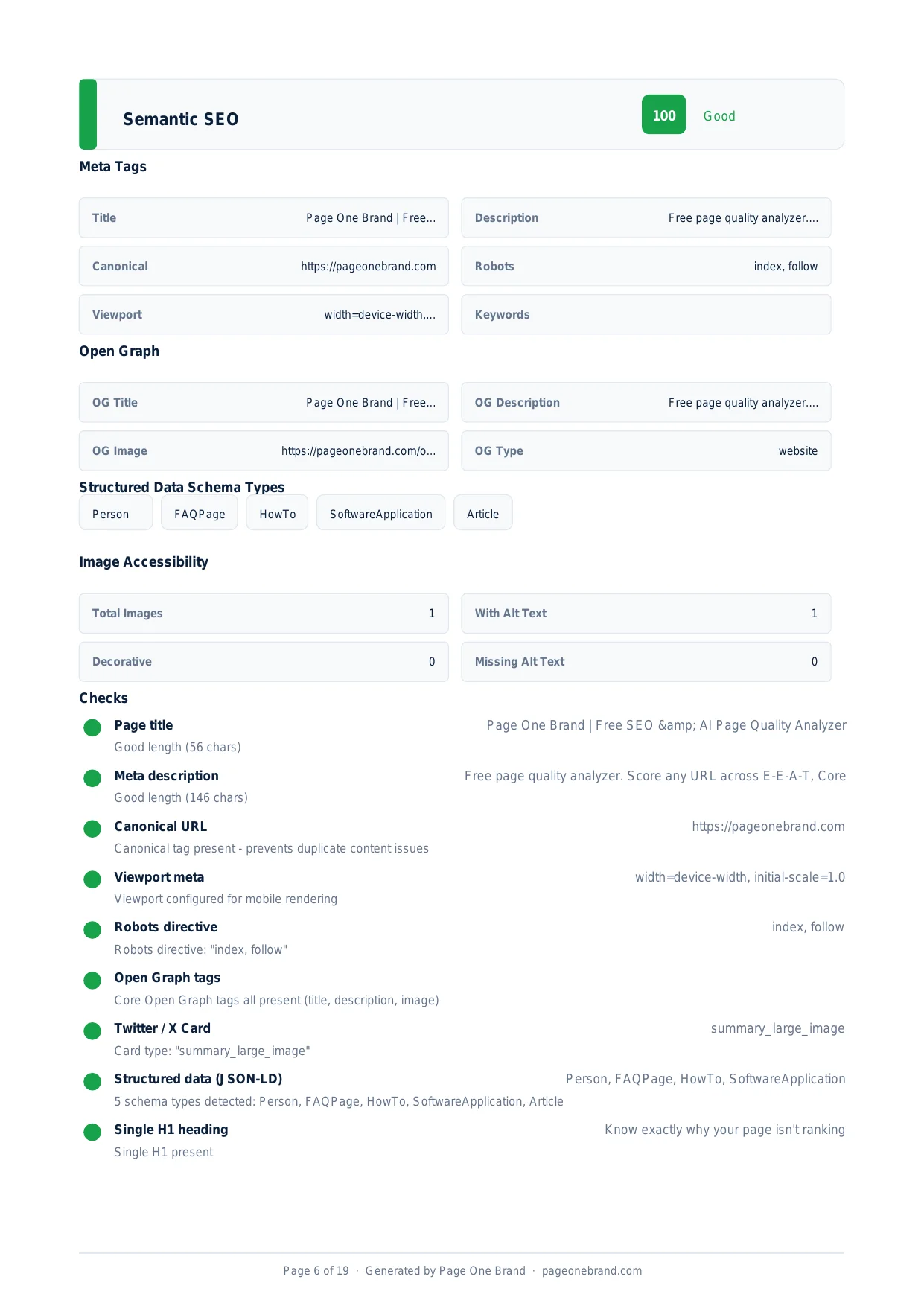 The Page Quality Analyzer checks heading hierarchy, HTML5 semantic elements, and image alt text as part of both the Accessibility and Semantic SEO dimensions — these signals overlap deliberately.
How to Improve Your Accessibility Score
A score of 100 is achievable and common on well-built pages. The highest-impact fixes:
- Add descriptive alt text to every non-decorative image
- Fix colour contrast on body text, headings, and interactive elements
- Add visible labels to every form input
- Ensure all interactive elements are reachable and operable with a keyboard
- Use semantic HTML elements for page structure (header, nav, main, footer, article, section)
These fixes are deterministic — there is a clear pass or fail for each — and most can be addressed in a single focused sprint. Accessibility improvements rarely require architectural changes, which makes this one of the most returnable dimensions to invest in.
Frequently Asked Questions About Web Accessibility and SEO
How does web accessibility overlap with SEO?
The overlap is structural: Google's crawler is, in a meaningful sense, a very sophisticated screen reader. It reads text, follows links, interprets headings, and processes structured markup — relying on the same semantic cues that assistive technologies use. This means the techniques that make a page usable for screen readers and keyboard users — descriptive alt text, semantic HTML, logical heading hierarchy, labelled form inputs — are the exact same techniques that help search engines understand and index content accurately. Pages with strong accessibility scores tend to have sound technical structure, which benefits both users and search engines simultaneously.
What are the most common accessibility failures detected by Lighthouse?
The five most common failures are: missing or inadequate image alt text (decorative images should have empty alt attributes; informative images need descriptive text); insufficient colour contrast (text that does not meet the WCAG 4.5:1 ratio is the single most common accessibility failure on the web); form inputs without labels (a placeholder disappears when the user starts typing — every input needs a visible, programmatically associated label); no skip link (keyboard users must tab through all navigation items on every page without one); and custom interactive elements with no keyboard support (dropdown menus, modals, and carousels built from divs often have no keyboard event handlers).
Is a perfect accessibility score of 100 achievable?
Yes, and it is common on well-built pages. Unlike Performance or E-E-A-T — which face structural ceilings or require sustained editorial investment — Accessibility is fully rule-based, with every check having a deterministic pass or fail. The highest-impact fixes are straightforward: add descriptive alt text to non-decorative images, fix colour contrast on body text and interactive elements, add visible labels to form inputs, ensure interactive elements are keyboard-accessible, and use semantic HTML landmark elements. Most of these can be addressed in a focused sprint without architectural changes, making Accessibility one of the highest-return dimensions to invest in.
Does improving accessibility directly improve search rankings?
Not directly, but the relationship is real and meaningful. Accessibility improvements feed into the Lighthouse Accessibility score, which the Page Quality Analyzer uses as a scoring dimension. More importantly, the underlying signals — semantic HTML structure, descriptive alt text, logical heading hierarchy — are the same signals that help Google understand and crawl content effectively. Accessible pages are also faster to use for everyone, which improves dwell time and reduces bounce rates. In many jurisdictions, accessibility is also a legal requirement under the EU Web Accessibility Directive, US ADA and Section 508, and the UK Equality Act — making it both an SEO and a compliance priority.